[WIP] Mario Worker: Community Edition

-
When its finished, this might be the definitive Mario Worker edition out there! This sounds really cool, and I guess it isn't bound the the limitations of Clickteam, like the massive lag from making big levels due to every tile being its own object. I can't wait to try it out!
"Stop quoting me on things I never said." - Sun Tzu
-
When its finished, this might be the definitive Mario Worker edition out there! This sounds really cool, and I guess it isn't bound the the limitations of Clickteam, like the massive lag from making big levels due to every tile being its own object. I can't wait to try it out!
-
 L looper231 pinned this topic on
-
Devlog from September 28:
- Made object picker have subcategories for better organization, which can be folded.
- Tilesets are now actually shown in the object picker. Each subcategory corresponds to its own TileSet, where you can select an atlas with tiles. (Pipes will be in their own tileset)
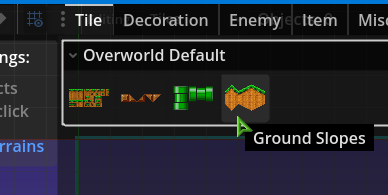
- When you select an atlas from object picker, a menu at the bottom appears with tiles to be selected within the atlas.
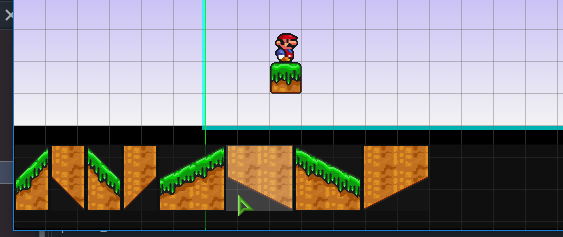
- The tile drawing itself isn't ready yet, but you will be able to paint over other tilesets, as well as change the drawing order for the whole tileset.
Alongside tilesets, there are some more changes:
- Categories (which is what you choose between enemies, items, tiles, etc) are now independent of each other when drawing, so you can paint enemies over coins for example.
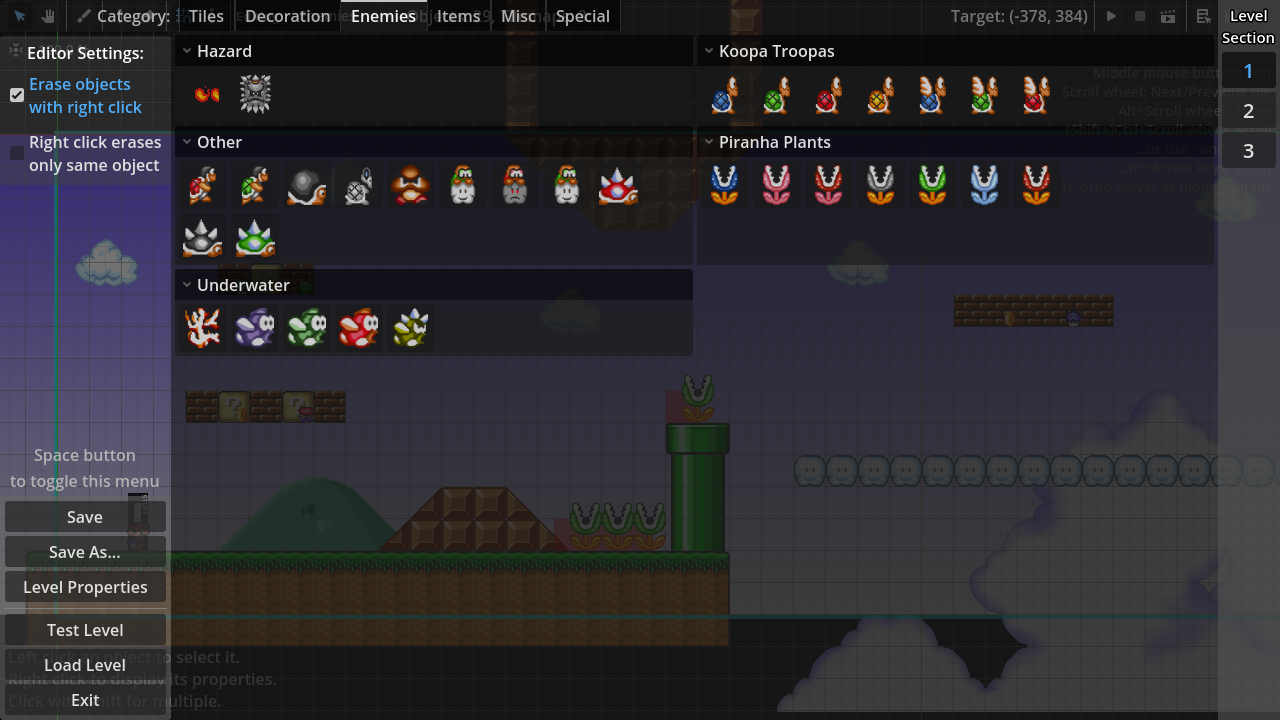
- Objects now show a visible 32x32 interaction box in the level editor when placed, so that you know where to interact with it (the object sprite itself is only visual). These red boxes appear only if you have the corresponding category selected.
-
- For example, the following image is in Enemies category:
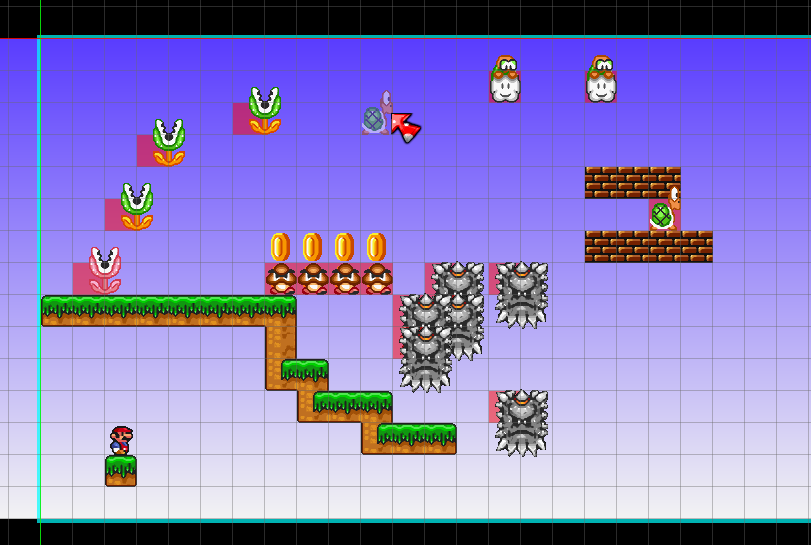
- For example, the following image is in Enemies category:
-
- Here is the Items category:
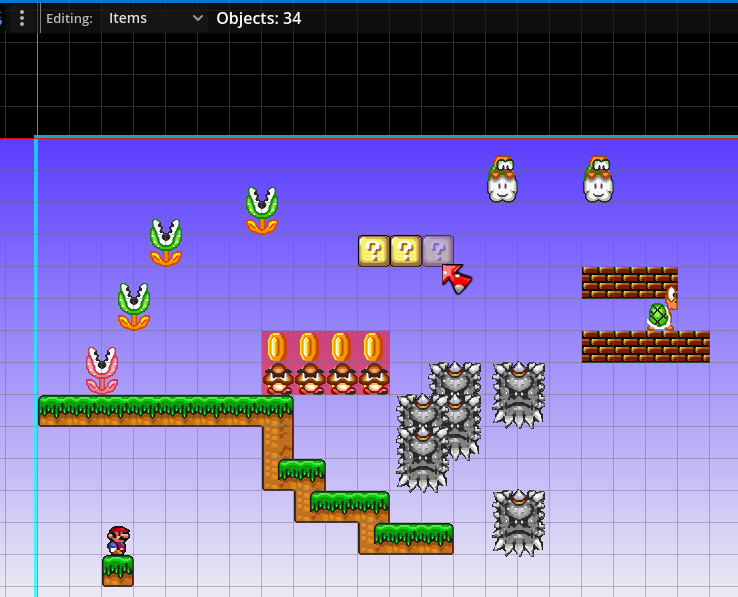
- Here is the Items category:
-
when do you think this will be finished? cuz it looks amazing
-
when do you think this will be finished? cuz it looks amazing
-
Devlog from September 29:
- Fully implemented tiles, can draw now
- Tile selection shortcuts by scroll wheel and 1, 2, 3, 4 keys added
- Tilemaps without any tiles are automatically deleted
New editor tile system in action:
https://nx.wtf/f/24h8/6563.mp4 -
Devlog:
- The gradient setting in level properties now actually works, and also some presets are available
- Pressing H key in the editor sets player's position to mouse cursor (not saved in the level)
- Picker tool now works with tiles, but not for objects yet. Also available by holding Ctrl and clicking a tile
- Different sections can be explored in the editor now
- The editor camera is now limited from (-640, -480) to (48640, 24480)
- Added a button to center editor camera on the first screen of the current section
- Added an editor option to erase any object of the selected category by right click. By default, it's off, only erasing objects of the same type
- The cyan outline around the level is the in-game camera limit, the settings for which i will add later
-
Devlog:
- Added support for translations
- Switching between editing categories now stores selected object for the previous category, like in MWR
- Holding Ctrl in the editor and pressing arrow keys now scrolls the camera like in MWR
- Added power-ups to the object list menu
- Power-ups can be inserted into Containers (question block and brick) by selecting the power-up to paint, hovering over a placed container and pressing left click
- Overworld music is now playing in levels (testing feature)
-
 J JUE13 moved this topic from Mario Forever on
-
Devlog:
- Added translations to some languages: French, Portuguese (Brazilian), Russian, Turkish, Vietnamese, and Chinese (simplified)
-
- Thanks to Sonilan, Ulvvis, Akanavy, Master 48, miyameon, Yaolinggui, and Yukana!
- Added a temporary way to change camera limits of levels, available under "Experimental" tab in level properties. This will be reworked in the future
- Added an option to make wide screen levels, available in the same "Experimental" tab
- Some editor settings are now saved between sessions
-
- Some of them have had their default values changed
- Eraser Tool now works with tiles category, erasing tiles from all tile maps, in contrary to right clicking with Paint Tool
- Added some simple decoration to showcase how it works
- New "Special" objects: Start Player Position, and Finish Line
- Added quick switching through objects using the mouse wheel or 1, 2, 3, 4 keys on keyboard, similar to MWR
-
- Previously this was only implemented for tiles
- Default grid settings for objects are now 16x16 pixels. Grid display has been adjusted to account for smaller grids
-
- Tiles will still have a 32x32 grid without offsets for performance reasons
-
- Some settings for tiles will be more customizable in the future
- Tiles in the bottom panel are now sorted a little better
- Mario can no longer go past the left border of the screen
-
- There are no restrictions for the right border of the screen yet
- The editor now supports high DPI displays, and will be scaled to 200% automatically for such screens
-
- Can be overridden by editing
editor_scaleproperty ineditor_config.thssfile. Values below 0.5 are "Auto"; set to 1.0 for 100% scale (the default)
- Can be overridden by editing
The prototype is going to be released in just a few days!!
Sorry for taking longer than what the video said. I will post a new video on YouTube when it releases, as well as another post in this thread. -
Here is a sheet with some enemies I would suggest to be added: https://www.spriters-resource.com/custom_edited/mariocustoms/asset/136823/
-Goombud
-Spike Top (red and blue)
-Banzai Bill
-Muncher
-Monty Mole (two kinds, hopping and chasing)
-Boo
-Spike
-Aimed Fireball/Iceball Piranha Plant (like SMB3)
-Sledge Bro
-Boom Boom and Para-Boom BoomAlso I'd like to suggest some para-enemies which doesn't require new sprites, such as the Para-Goomba and the Para-Spiny from Super Mario Maker.
I also made a SMB1 Gao sprite for SMBX, maybe you can use that?

Enemies I am interested to sprite if you want:
-Bony Beetle
-Thwimp
-Para-Beetle (SMB3)
-Mega Mole
-Sideways Thwomp
-Other Super Mario Land enemies -
Prototype Build 1 release!
Youtube VideoDownload: https://nx.wtf/s/aVtZ?path=Games%2FMario%2520Worker%2520-%2520Community%2520Edition
-
I know this is only a prototype build, but I have a couple suggestions for features that I think should be either in an update or the full release:
Ctrl + Z and Ctrl +Y keys as Undo and Redo keys.
The ability to select multiple objects at once with a selection box.
Different level goals - Flagpole, SMB3 box, pipes and etc.
Enemies from other Mario games.
Visual effects in level, so people can recreate world 3-4 and do other cool stuff.
-
I suggest to change "nível" to "fase" in the PT-BR translation.