[WIP] Mario Worker: Community Edition
-
Devlog:
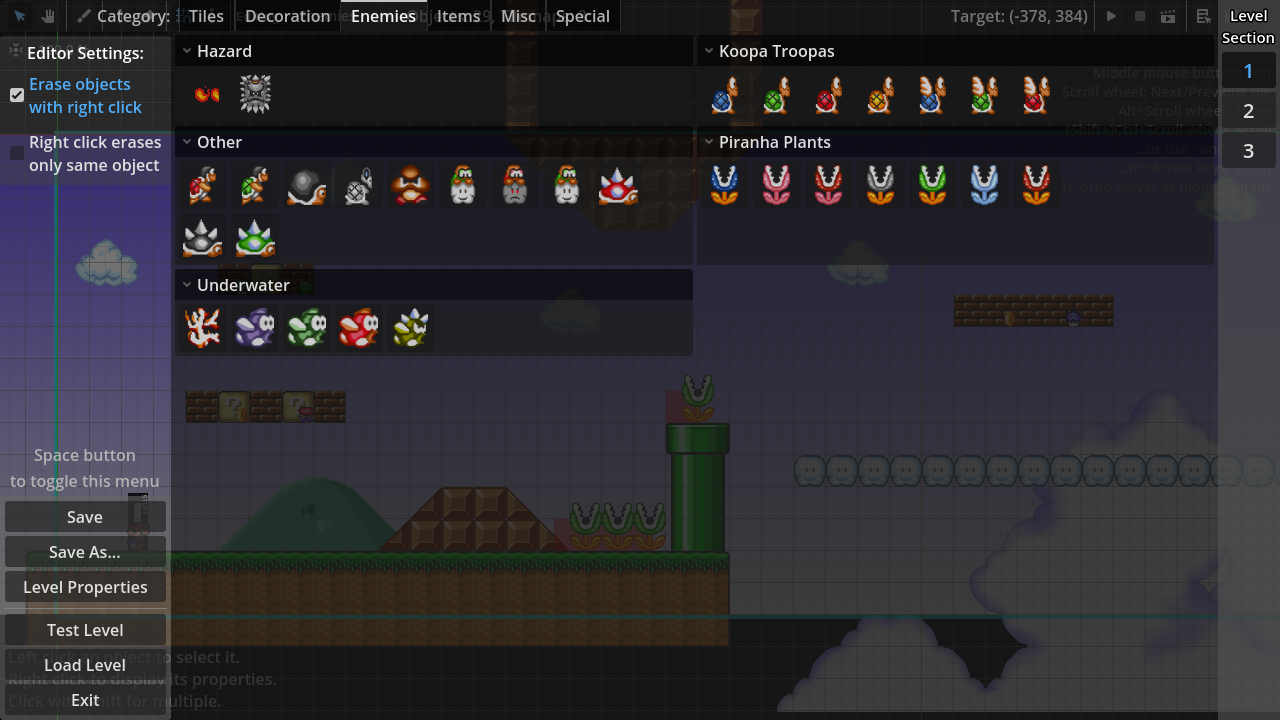
- The gradient setting in level properties now actually works, and also some presets are available
- Pressing H key in the editor sets player's position to mouse cursor (not saved in the level)
- Picker tool now works with tiles, but not for objects yet. Also available by holding Ctrl and clicking a tile
- Different sections can be explored in the editor now
- The editor camera is now limited from (-640, -480) to (48640, 24480)
- Added a button to center editor camera on the first screen of the current section
- Added an editor option to erase any object of the selected category by right click. By default, it's off, only erasing objects of the same type
- The cyan outline around the level is the in-game camera limit, the settings for which i will add later
-
Devlog:
- Added support for translations
- Switching between editing categories now stores selected object for the previous category, like in MWR
- Holding Ctrl in the editor and pressing arrow keys now scrolls the camera like in MWR
- Added power-ups to the object list menu
- Power-ups can be inserted into Containers (question block and brick) by selecting the power-up to paint, hovering over a placed container and pressing left click
- Overworld music is now playing in levels (testing feature)
-
 J JUE13 moved this topic from Mario Forever on
-
Devlog:
- Added translations to some languages: French, Portuguese (Brazilian), Russian, Turkish, Vietnamese, and Chinese (simplified)
-
- Thanks to Sonilan, Ulvvis, Akanavy, Master 48, miyameon, Yaolinggui, and Yukana!
- Added a temporary way to change camera limits of levels, available under "Experimental" tab in level properties. This will be reworked in the future
- Added an option to make wide screen levels, available in the same "Experimental" tab
- Some editor settings are now saved between sessions
-
- Some of them have had their default values changed
- Eraser Tool now works with tiles category, erasing tiles from all tile maps, in contrary to right clicking with Paint Tool
- Added some simple decoration to showcase how it works
- New "Special" objects: Start Player Position, and Finish Line
- Added quick switching through objects using the mouse wheel or 1, 2, 3, 4 keys on keyboard, similar to MWR
-
- Previously this was only implemented for tiles
- Default grid settings for objects are now 16x16 pixels. Grid display has been adjusted to account for smaller grids
-
- Tiles will still have a 32x32 grid without offsets for performance reasons
-
- Some settings for tiles will be more customizable in the future
- Tiles in the bottom panel are now sorted a little better
- Mario can no longer go past the left border of the screen
-
- There are no restrictions for the right border of the screen yet
- The editor now supports high DPI displays, and will be scaled to 200% automatically for such screens
-
- Can be overridden by editing
editor_scaleproperty ineditor_config.thssfile. Values below 0.5 are "Auto"; set to 1.0 for 100% scale (the default)
- Can be overridden by editing
The prototype is going to be released in just a few days!!
Sorry for taking longer than what the video said. I will post a new video on YouTube when it releases, as well as another post in this thread. -
Here is a sheet with some enemies I would suggest to be added: https://www.spriters-resource.com/custom_edited/mariocustoms/asset/136823/
-Goombud
-Spike Top (red and blue)
-Banzai Bill
-Muncher
-Monty Mole (two kinds, hopping and chasing)
-Boo
-Spike
-Aimed Fireball/Iceball Piranha Plant (like SMB3)
-Sledge Bro
-Boom Boom and Para-Boom BoomAlso I'd like to suggest some para-enemies which doesn't require new sprites, such as the Para-Goomba and the Para-Spiny from Super Mario Maker.
I also made a SMB1 Gao sprite for SMBX, maybe you can use that?

Enemies I am interested to sprite if you want:
-Bony Beetle
-Thwimp
-Para-Beetle (SMB3)
-Mega Mole
-Sideways Thwomp
-Other Super Mario Land enemies -
Prototype Build 1 release!
Youtube VideoDownload: https://nx.wtf/s/aVtZ?path=Games%2FMario%2520Worker%2520-%2520Community%2520Edition
-
I know this is only a prototype build, but I have a couple suggestions for features that I think should be either in an update or the full release:
Ctrl + Z and Ctrl +Y keys as Undo and Redo keys.
The ability to select multiple objects at once with a selection box.
Different level goals - Flagpole, SMB3 box, pipes and etc.
Enemies from other Mario games.
Visual effects in level, so people can recreate world 3-4 and do other cool stuff.
-
I suggest to change "nível" to "fase" in the PT-BR translation.