Skip to content
  • Rules
  • Recent
  • Tags
  • Popular
  • External Links
    • Download Mario Forever
    • Cloud Lounge Discord
    • Mario Forever Wiki
    • Chinese Mario Forever Forum
    • List of Mario Forever Fangames
    • Mario Forever File Archive
Collapse
Mario Forever Space - International Mario Forever Forum
JUE13J

JUE13

@JUE13
Admin
About
Posts
24
Topics
6
Shares
0
Groups
1
Followers
8
Following
2

Posts

Recent Best Controversial

  • [WIP] Mario Worker: Community Edition
    JUE13J JUE13

    This is a development thread. Prototype is available.

    A preview version, the Prototype Build 1, is available to download.

    Mario Worker: Community Edition

    Youtube Video

    A Mario Forever level editor based on Thunder Engine. A successor to other Mario Worker editors out there.

    I started the development back in February of 2025, but after a long hiatus and release of MF:CE v2.0 update, I decided to come back to this project in September of 2025.

    Project Source code: https://github.com/meteo-dream/mario-worker-ce

    Current progress: Prototype Build 1 is available with the most basic features.

    Prototype Build 1 Features

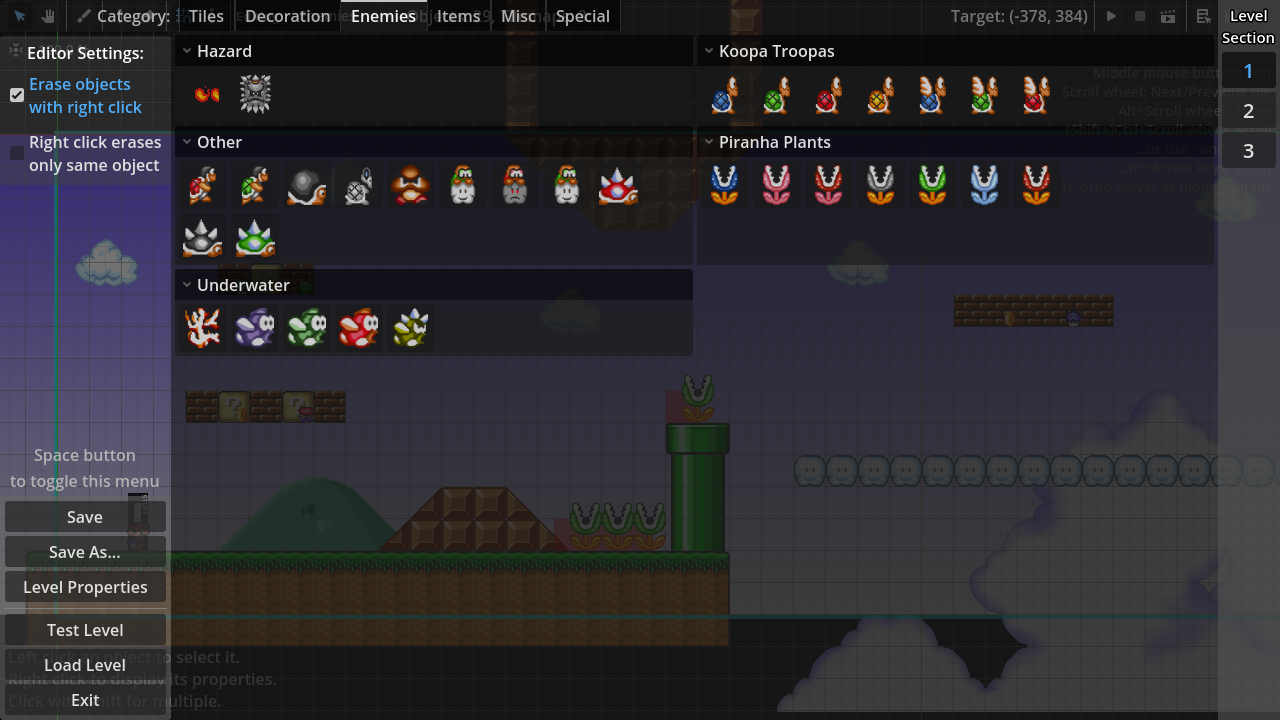
    • Can edit, load, save, and play levels
    • Pressing Space opens up the tile/object picker menu
    • Some enemies that come by default in Thunder Engine are available
      • More complex enemies (yellow paratroopas, rotodiscs, etc.) are planned for later
    • Can resize the editor window without stretching its contents, for more comfortable level building
      • Levels will still be played in 640x480 window like usual
    • Select tool, Pan tool, Paint tool, Pick tool, Erase tool, and grid customization
    • Camera zooming in level editor
    • Use either Pan Tool to move the camera, or hold middle mouse button in any tool
      • Hold Ctrl and use arrow keys for classic scrolling
    • Controllable player in the editor, which may help with tile placements a little
    • Very basic level properties
      • Level information and time limit
      • Gradient background for the current section
      • Camera limits for the current section
      • "Wide-screen" checkbox, which will resize the game window to 864x480 resolution if checked
    • Selecting individual objects with the Select tool, that can then be either removed by pressing Delete key, or edited by pressing right click
      • Select multiple objects by holding Shift
      • Better selection experience will come later
    • 3 sections per level, limited to 48000x24000px each
      • Up from 2 sections limited to 20000x10080px each in MWR
      • Sections are modular, so in theory, there can be an infinite amount of sections
      • Unfinished: tiles cannot be placed on sections other than 1, and there is no way to navigate between them in a level
    • Most tiles from the original MF, along with some featuring slopes
    • An option for some tilesets to draw terrain that connects with neighboring tiles automatically
    • Power-ups, that could be put inside question blocks, or placed on levels as is
    • Basic Overworld decoration objects
    • Several language translations are available
    • Special objects: initial player position and finish line

    MWCE-editor.png
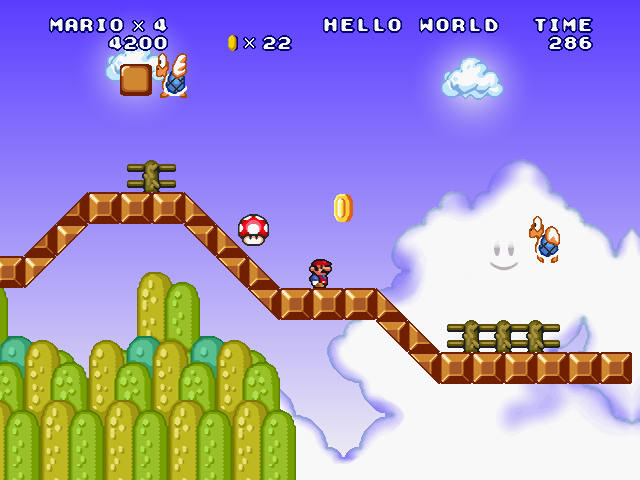
    MWCE-gameplay.png

    Planned features (for full release)

    • Properties for individual enemies
      • Either a dropdown box, or a list on the right-side panel
    • Most, if not all, hazards and enemies from original MF
    • Pipe and door warps
    • Tileset editor, along with custom tiles
    • Custom music in levels
    • Parallax background and foreground
    • Brown/Blue/Gray bricks and question blocks for each section
      • Will also make these sprites customizable in the future
    • Scenario system
      • Will be an integral part of created levels
      • Will have more options that will affect all levels in the scenario
      • The player can either choose to play the whole scenario, or an individual level of it
      • Editable cutscenes between levels in scenarios
    • Platforms and options for them
    • Water and lava
    • Complex enemies and hazards, like roto-discs, podoboos, and others
    • Exporting levels in ZIP archives and loading them directly, which would solve the frequent problem of MWR when it comes to custom stuff
      • Might mask it under a custom format, so that people don't confuse it with non-playable ZIP archives
    • Simple map system with ability to insert a PNG image of a map
    • Some tweaks from MF: Community Edition, including Luigi, skins, and engine tweaks

    Planned in the far future

    • Undo/Redo system
    • Editable camera areas in sections, similar to Hardcore World 1-3
    • Most stuff that MWR provides, along with additions from our own projects and other stuff that I can come up with
    • Forced/Preferred engine tweaks for scenarios
    • Expandable screen size per scenario (from 640x480 up to 1280x720)

    I will continue updating the post and posting in this thread as the development progresses. Might take a while for a full release to come out, though. Periodically, I will release public prototypes.

    DOWNLOAD: https://rnx.su/s/MarioWorkerCommunityEdition

    Mario Worker

  • We have international forum?
    JUE13J JUE13

    Hello! welcome to the new forum!

    Introduce Yourself

  • Lipsum Post
    JUE13J JUE13

    I hate Lorem Ipsum.

    Chaos

  • [WIP] Mario Worker: Community Edition
    JUE13J JUE13

    Devlog from September 28:

    • Made object picker have subcategories for better organization, which can be folded.
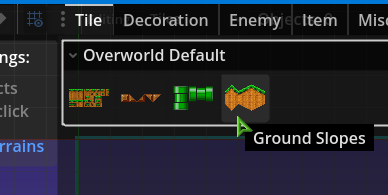
    • Tilesets are now actually shown in the object picker. Each subcategory corresponds to its own TileSet, where you can select an atlas with tiles. (Pipes will be in their own tileset)
      mwce-1.png
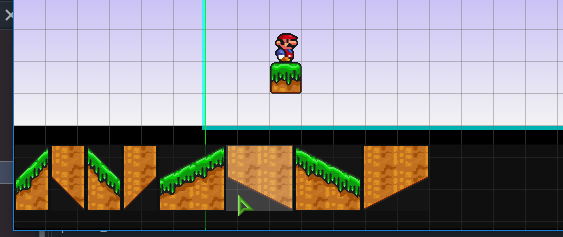
    • When you select an atlas from object picker, a menu at the bottom appears with tiles to be selected within the atlas.
      mwce-2.png
    • The tile drawing itself isn't ready yet, but you will be able to paint over other tilesets, as well as change the drawing order for the whole tileset.

    Alongside tilesets, there are some more changes:

    • Categories (which is what you choose between enemies, items, tiles, etc) are now independent of each other when drawing, so you can paint enemies over coins for example.
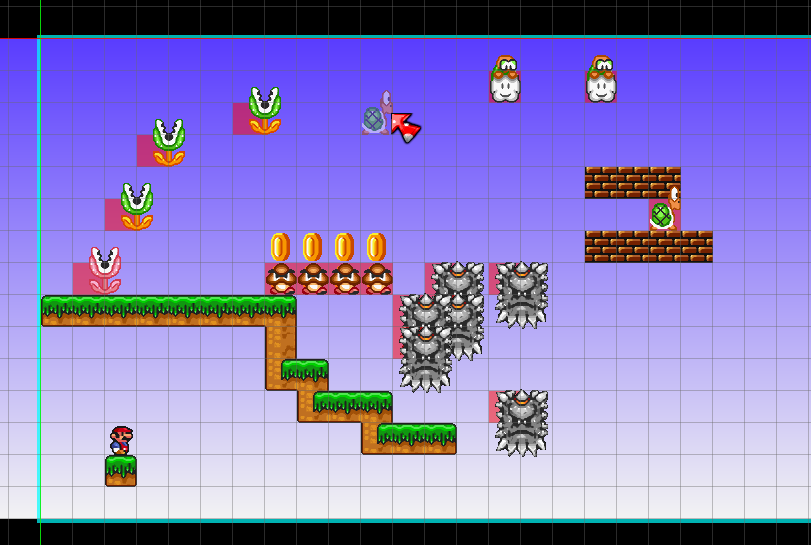
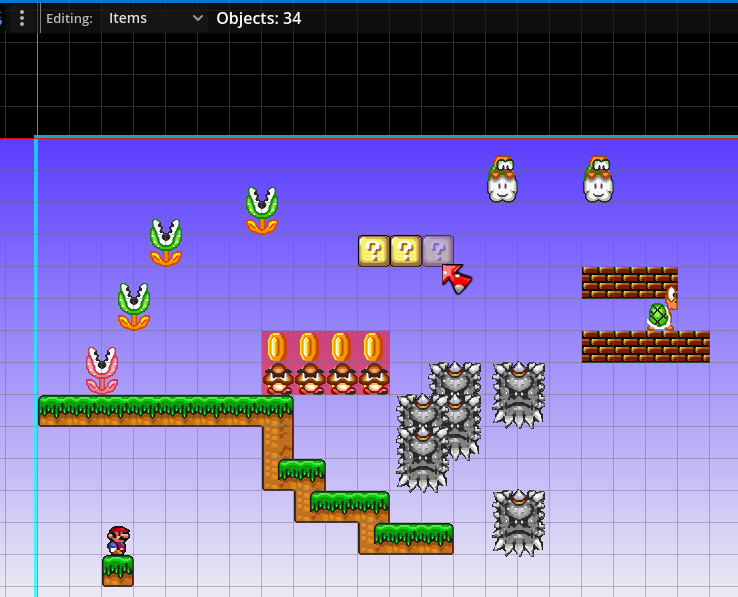
    • Objects now show a visible 32x32 interaction box in the level editor when placed, so that you know where to interact with it (the object sprite itself is only visual). These red boxes appear only if you have the corresponding category selected.
      • For example, the following image is in Enemies category:
        mwce-4.png
      • Here is the Items category:
        mwce-5.png
    Mario Worker

  • Mario Forever: Community Edition | Latest Version
    JUE13J JUE13

    Mario Forever: Community Edition

    Download the latest version of the game here!

    • Download v2.1.3 for Windows (64-bit) (Mirror link on MEGA)
    • Download v2.1.3 for Linux (x86-64) (Mirror link on MEGA)

    For a list of changes, scroll down to the section "MFCE Update Change Log".

    Game website: https://mfce.rnx.su
    Other Mario Forever games made by the team: https://rnx.su/s/MeteoDream?dir=/Games

    Installation

    To install it, just extract it anywhere. Your save data is stored in a different location on your computer.

    If you are updating the game, you can extract to the same location as the previous version, replacing the files.

    If you want to inspect your save files, locate to the following directory:

    %appdata%\MeteoDream\Mario Forever Community Edition

    Before version 2.0.0, the save data location was different. The following location is used for saving in versions 1.0 and 1.1:

    %appdata%\Redot\app_userdata\Mario Forever- Community Edition

    Please note that when upgrading from 1.0 or 1.1 to 2.0.0 or up, all your data is automatically copied over from the old location to be used in the newer version. This happens if the game could not detect the folder in %appdata%\MeteoDream. No action from the user is required when upgrading.

    The only files related to your game progress are files in thss extension and the saves folder.

    Troubleshooting

    IMPORTANT NOTE for INTEL GPU/IGPU USERS (both integrated Intel Graphics and dedicated Intel Arc): Use the bat file named 01. Launch in Compatibility Mode to launch the game if you are experiencing graphical glitches.

    If your graphics card does not support Vulkan or the game otherwise does not run properly by launching the executable, first, try updating the graphics drivers. Most problems are solved just by updating the drivers on your computer.

    If updating the drivers did not help and the game still displays incorrectly or crashes on startup, try running the batch file included with the game named 01. Launch in Compatibility Mode.bat. This will force the game to run in Compatibility renderer (OpenGL). Alternatively, you can try 02. Launch in Compatibility Mode (angle).bat, which forces the game to run in Direct3D 11 compatibility renderer.

    Please note, that Compatibility Mode is not a recommended way to play and we don't take any responsibility for any visual bugs or glitches that may occur during playthrough.

    If the game is occasionally stuttering on Windows during gameplay, you can try setting CPU priority of the game to "Above Normal" or "High" in task manager. If you don't know how to do it, google it.

    If you're having microstutters during gameplay, make sure you have VSync enabled in the game options. If you are still having microstutters on 2x Buffer, you can try setting VSync to 3x Buffer and then restarting the game when prompted. Note that triple buffering increases input lag, but it shouldn't be a problem for high refresh rate displays. Windows 10 is known for causing microstutters in windowed mode; upgrading to Windows 11 23H2 can eliminate this problem.

    System Requirements

    Minimum:

    • OS: Windows 7 x64 / Linux x64
    • CPU: Any x86-64
    • RAM: 2 GB
    • GPU: Integrated graphics with full OpenGL 3.3 support
    • Storage: at least 350 MB of free storage space

    Recommended:

    • OS: Windows 11 x64 build 23H2 / Linux x64
    • CPU: Any x86-64
    • RAM: 4 GB
    • GPU: Dedicated graphics with full Vulkan 1.2 support
    • Storage: at least 400 MB of free storage space

    Linux build has been tested on Ubuntu 24.04.

    MFCE Update Change Log

    Version 2.1.3

    Released on January 31st, 2026.

    Changes:

    • The "Frozen Castle" Minix map is now easier.
    • The "Christmas Laboratory Completed" achievement is now visible on the achievements table (on page 2).

    Fixes:

    • Fixed MF Flash 3-4 completion leading to a black screen.
    • Fixed a bug where the Atom Replenisher item did not account for custom skin sound.
    • Fixed "Open Documentation" button in Skin Setup having a dead link.
    • Fixed a bug where the pitch_music_everywhere hidden tweak required a deprecated copyright_free_ost to be enabled.

    For a list of changes between older versions, refer to this forum thread.

    Download: https://rnx.su/index.php/s/DZm6PEkZf3z4owp

    Mario Forever: Community Edition release

  • Skin Pack Guide
    JUE13J JUE13

    Skins in Thunder Engine games

    Welcome to a guide about creating your own player skin and using it in Mario Forever Community Edition (MFCE).
    This guide will describe all the nuances about creating your own character for this game (and for Thunder Engine in general).

    Important

    Before moving on, please note the following:

    • A player skin is a customized audio-visual appearance of a character you're playing (Mario or Luigi), which means custom textures (sprites), custom voice lines, and custom sound effects can be applied to a player skin.
    • This means that you can play as either Mario or Luigi regardless of what skin you currently have.
    • A player skin cannot have modified physics or alter the game in any way other than the character you're playing. (Some global sound effects are an exception.)
    • All images should be in PNG format, and all audio files should be in OGG Vorbis format (.ogg).
    • Sprites are positioned centered on the player, which means that increasing the image height past the normal 64 pixels would grow the skin in all 4 directions. You can avoid that by balancing out the increased height, adding some empty space below your textures.
    • You can use the Skin Editor to have a better visual representation of the skin you're editing, but it is just a GUI helper tool and is not required.
    • In v2.0, a new menu in Tweaks has been added: the Skin Setup. It can greatly help with testing the skin functionalities.
      • Alternatively, to test the skin quickly, enable the Console tweak (available after beating the game or using the Konami code in tweaks menu), go to Save Room, enter reloadskins to the console, and update your power-up.
        • Note that reloadskins does NOT immediately apply the player suit changes to your character if used mid-game, and a manual power state update is required (can also be done with the power command, e.g. power super).

    If you have trouble loading an old skin in a newer version of the game and need to update it, refer to section "Updating the Skin for MFCE v2.0" of this post.

    Installing a Skin

    Go to the directory where the game is installed, and open a folder named skins. If you've downloaded a custom skin, extract the contents of the archive inside that folder. (Note that every skin must be in its own folder.)

    The folder name inside the skins folder becomes a name of the skin in the skin selector.
    This folder will be referenced in this guide as a skin root folder.

    The game should now detect the skin and add a selection to the "SKIN PACK" option in the Tweaks menu.
    It does a check for the skin folder once on game launch and every time you go back from the tweaks menu (but can be triggered mid-play using the reloadskins console command).

    If upon selecting the skin and exiting the tweaks menu you did not receive any errors, you have installed the skin correctly and, if you do not intend to edit the skin further, you can close the guide now.

    Setting Up a Custom Name

    To change the name in Heads-Up Display (HUD) and cutscenes, open your skin in the Skin Editor and click "Options".

    The name can not be longer than 15 characters. Non-latin characters are not supported and might be displayed as garbage, although numbers and some special characters are allowed.

    Additionally, you can customize the story mode text when referring to the character you're playing.

    Custom Player Suit Animations

    The main purpose of a player skin is to be able to change animations of the player suits.
    A player suit is what you transform to after obtaining/losing a power-up.

    For starters, each folder inside the skin root folder is regarded as a player suit. Hence, such folders will be referenced in this guide as player suit folders.

    There are 8 suits in total currently available in Thunder Engine, each of them can be modified using a player skin:

    • small,
    • super,
    • fireball,
    • beetroot,
    • green_lui (for both Green Lui & Red Mar),
    • boomerang,
    • iceball,
    • frog.

    Each folder requires a skin_settings.tres file to be present, which contains SpriteFrames settings for the animation of the suit.

    Omitting a texture, a player suit folder or a skin_settings.tres file, will cause the game to load a default character texture/animation set (Mario or Luigi).
    To make sure that there are no problems with your skin, use the Check for Errors option in the Skin Setup, located in the tweaks menu.

    Please note that if you omit a lot of the textures (or all of them), there might be problems with loading default animations if you were/are playing as Luigi (some suits may display as Mario, others as Luigi).

    Animation List

    Creating custom player suit animations requires you to be familiar with how each animation is used in the game, so here's a list of them and a brief explanation of where it is used:

    • appear: Animation that plays for 1 second when the player transforms into the current suit.
    • attack: Attacking while on the ground (e.g. launching a fireball). If the suit provides no way to attack, it goes unused for that suit.
    • attack_air: Attacking while mid-air. Can be enabled using a skin tweak. Same principle as attack.
    • back: Unused in MFCE (yet). Supposed to be for warping between doors.
    • climb: Climbing a vine like in Super Mario Bros. 3. Note that Version 2.0.0+ makes it a proper animation, instead of flipping sprites on a hard-coded timer, like it was before.
    • crouch: Crouching down. For the frog suit, this is not used. For small, it can only be seen briefly with the Crouch Jumping tweak enabled.
    • default: Standing still.
    • fall: Being in mid-air while moving down to the ground, or falling. Can be replaced by jump with a skin tweak.
    • grab: Grabbing something underneath.
    • hold_crouch: Crouching while holding an item.
    • hold_default: Standing still while holding an item.
    • hold_fall: Falling while holding an item. Can be replaced by hold_jump with a skin tweak.
    • hold_jump: Jumping while holding an item.
    • hold_walk: Walking on the ground while holding an item.
    • hold_swim: Swimming while holding an item.
    • jump: Being in mid-air while moving away from the ground, or jumping.
    • kick: Throwing a held item. Also used for kicking shells if "Kick Ground Animation" skin tweak is enabled.
    • skid: Turning around, or skidding. Can be enabled using a tweak.
    • slide: Sliding down a slope.
    • swim: Swimming underwater.
    • swim_down: Frog suit only: Swimming downwards.
    • swim_up: Frog suit only: Swimming upwards.
    • walk: Moving on the ground.
    • warp: Warping between pipes. Can be disabled using a skin tweak.
    • win: Win pose, used in the ending cutscene.

    Skin Tweak Animation List

    Additionally, if the respective skin tweaks are enabled, the following animations become available (These have to be added into skin_settings.tres, too):

    "Separate Run Animation":

    • p_run: Running at max speed.
    • p_jump: Jumping while running at max speed.
    • p_fall: Falling after jumping while running at max speed. If Fall Animation is disabled, replaced with p_jump.
    • hold_p_run: Same as p_run, but while holding an item.
    • hold_p_jump: Same as p_jump, but while holding an item.
    • hold_p_fall: Same as p_fall, but while holding an item.

    "Look Up Animation":

    • look_up: Standing still and pressing up.
    • hold_look_up: Same as look_up, but while holding an item. Note that while looking up does sometimes make the item go straight up when kicked, it has nothing to do with the animation itself.

    "Idle Animation":

    • idle: Standing still for Idle Animation After Sec amount of time, which is 10 by default. Interrupted by doing literally anything.

    Custom Animation Images

    Each animation for the player suit should have its own image in a PNG format, with animation name in the "Animation List" section as its file name (e.g. default.png). If you need multiple frames in the animation, make a spritesheet in that image.

    It is highly recommended to not provide huge images (over 2048 pixels), as that may negatively impact the resource usage of the game, and some graphics cards may not support such dimensions.

    Now, let's set up our animation in the next section.

    Skin Settings

    As previously stated, each animation should contain its own skin_settings.tres. This file can be used to modify playing speed, set up sprite regions, and choose whether it should be looped.

    It is best to modify the animations using the Skin Editor provided with the game. It is basically a GUI tool for editing such files. But if you don't feel comfortable using it, you can keep reading.

    If you are creating a new skin, you can copy a skin_settings.tres file from the bundled "revamped mario" skin, or use the Skin Editor to create one. Now, let's examine what it contains.

    Open up skin_settings.tres with a Notepad or any other text editing program. Inside, at the beginning of the file, you may see some header text. It is not important. (Be aware that in versions v1.1 and below, the header is required for the skin to work properly, which may cause security issues if downloaded from an untrusted source.)

    Setting Up the Animations

    Now the important part. There are three lists (called Dictionaries), going one after another, which contains settings data for all animations for the player suit. Make sure to follow the JSON format inside of these lists! Commas are important!

    • animation_speeds list is used to set speed for the animations, where FPS is used as a unit, e.g. setting it to 60 will play the animation in 60 FPS with game speed set to 1X. It can be in a float format (e.g. 1.25) and must be in a range between 0 and 120.
    • animation_regions list is the most important one. This is where you set coordinates and dimensions for each frame in the animation. Each value is represented as an array of Rect2 in format Rect2(x, y, w, h), where x and y are an offset/position of the frame in the image starting from top-left corner and going rightwards and downwards accordingly, and w and h are dimensions of the frame in pixels.
      • For example, if we assume that the image has a resolution of 96x64, "default": [Rect2(0, 0, 48, 64), Rect2(48, 0, 48, 64)] will make a 2-frame animation for a default (standing still) animation, where the first frame is a region going from the top-left corner down to coordinate (48, 64), and the second frame is a region going right after the first one to the right, going down to coordinate (96, 64), since it has the same dimensions.
    • animation_loops list is used to tell if the animation is looped or not, which is self-explanatory. For some animations, this does not matter, and can be either true or false.
    • animation_durations list is used to make the frame last longer/shorter. 1.0 is the default speed.

    Additionally, if you need to specify what frame should the animation go to after looping, you can either use the Skin Setup menu in MFCE, or edit the suit_tweaks.json file, under "loop_frame_offsets".
    Note that the values are 0-based. Negative values are ignored and will loop from the beginning.

    Custom Misc Textures

    The following textures are not a part of a player suit, but can be changed using Player Skins as well:

    • death.png is what is shown upon player death. It cannot have any animations.

    • selector.png is a selector image in main menus (Mario's/Luigi's head). Unlike the default selector, a selector with skins can only be a static image.

    • map_icon.png is an image in the corner of a map screen. It is correctly displayed with dimensions 118x88.

    • particle.png is used when the corresponding property is enabled in the Skin Setup menu (suit_tweaks.json file).

    All custom miscellaneous textures should be in PNG format inside the skin root folder.
    Any other image in PNG format located in the skin root folder is loaded into memory, but will be completely unused.

    It is highly recommended to not provide huge images (over 2 MB), as that may negatively impact the resource usage of the game.

    Custom Global Sounds

    Using the Player Skin system, some sound effects can be modified independently from the suit.

    All custom global sounds should be in OGG Vorbis format (.ogg) inside the folder named _global_sounds.

    You can observe and test all the available global sounds in the Sound Test menu, located in Tweaks > Skin Setup (MFCE only). Note that added sounds are not updated immediately and require a re-enter to the tweaks menu, to trigger the skins update.

    All sounds can have up to 10 variations played at random. Accepted file name format is either sound.ogg or sound_#.ogg, where sound is the sound name, and # is a number from 0 to 9.

    • oh_no.ogg voice line is played when the player encounters an enemy on a map or falls into a Lava Run section.
    • fall.ogg voice line is played when the player falls into a Lava Run section.

    More sound effects to customize can be found in Sound Test menu from Skin Setup.

    Omitting any of these will load a default global sound for the current character (Mario or Luigi).

    Custom Suit Sounds

    There is a number of custom sounds that can be changed independently of each suit. These, too, can have up to 10 variations. Here's a list of them:

    • "jump": Jumping sound.
    • "swim": Swimming sound.
    • "hurt": Taking damage and reverting to Super/Small suit.
    • "powerup": Grabbing a power-up and transforming into a new suit.
    • "powerup_no_transform": Grabbing a power-up without transforming into a new suit.
    • "pipe_in": Entering warp pipes.
    • "pipe_out": Exiting warp pipes.
    • "look_up": Played when pressing Up movement key while standing.
    • "attack": Played when throwing projectiles. Only for suits that have this ability.
    • "skid": Skidding. Can be disabled using a gameplay tweak. Delay between sounds can be customized in the Suit Tweaks.
    • "grab": Grabbing something.
    • "kick": Kicking something.
    • "ice_slide": Sliding on a slippery surface (like ice).
    • "jump_small": Frog suit only: small jumping sounds when hopping on land.

    Suit Sounds should be located in their own sounds folder in the player suit folder, e.g. revamped mario/beetroot/sounds. If needed, duplicate the sounds for each suit.

    Like with Custom Global Sounds, Suit Sounds should be in OGG Vorbis format (.ogg).

    Notes:

    • hurt.ogg only applies when the player takes damage, and is independent from the warping sound.
    • Custom death.ogg is only played in areas where the default SMW death music is played. Other instances of the death sound effect (e.g. The Lost Map, World of Stupidity, etc.) are left intact.
      • This can be changed through Global Skin Tweaks.

    Updating the Skin for MFCE v2.0

    Version 2.0 of Mario Forever: Community Edition changed the way the sounds are loaded, which was required for better organization.

    All custom voice lines that were previously available in v1.1 should now be located at directory _global_sounds inside the skin root folder. However, custom sound effects are now suit-dependent, and should be located in their own sounds folder in the player suit folder, e.g. revamped mario/beetroot/sounds.

    If you need assistance...

    You can ask your question in this thread.

    Skin Packs

  • [WIP] Mario Worker: Community Edition
    JUE13J JUE13

    Devlog from September 29:

    • Fully implemented tiles, can draw now
    • Tile selection shortcuts by scroll wheel and 1, 2, 3, 4 keys added
    • Tilemaps without any tiles are automatically deleted

    New editor tile system in action:
    https://rnx.su/index.php/s/XR3XWdfyCWAEYmL?dir=/

    Mario Worker

  • MF:CE Version History
    JUE13J JUE13

    MFCE Update Change Log Archive

    This forum post is a list of changes between released versions of Mario Forever: Community Edition.

    To download the latest version and learn more, refer to this forum thread.

    Version 2.1.3

    Released on January 31st, 2026.

    Changes:

    • The "Frozen Castle" Minix map is now easier.
    • The "Christmas Laboratory Completed" achievement is now visible on the achievements table (on page 2).

    Fixes:

    • Fixed MF Flash 3-4 completion leading to a black screen.
    • Fixed a bug where the Atom Replenisher item did not account for custom skin sound.
    • Fixed "Open Documentation" button in Skin Setup having a dead link.
    • Fixed a bug where the pitch_music_everywhere hidden tweak required a deprecated copyright_free_ost to be enabled.

    Version 2.1.2

    Released on January 27th, 2026.

    All versions released prior have a non-functional Update Checker now, unfortunately.

    Additions:

    • Added 2 new maps to Mario Minix: Overwater and Frozen Castle.
      • The "100,000 score in all Minix maps" now accounts for these new maps too, but if you already have this achievement unlocked, it will stay unlocked even after updating.

    Changes:

    • Improved the way overlays are displayed on some maps: they actually overlay stuff now.
    • Random music tracks in Mario Minix are less repetitive now if the same map is played over and over again.
    • Autopause by focus loss will no longer be triggered during the end level sequence.
    • Some underground levels got minor graphical improvements in Maximum quality.
    • Spikeball Launchers got a better sprite (credit to Bullex).

    Fixes:

    • Fixed the Update Checker being non-functional.
    • Fixed a bug with a circle transition where it would wrongly stretch and not be centered on the player if the window gets scaled at any point.
    • Fixed a bug with a circle transition where it would appear too suddenly if centered at the corner of the screen.
    • Fixed a bug with a circle transition where it would not open correctly during lag frames.
    • Fixed one of the Human Lab house tiles being misaligned.
    • Fixed a bug in Mario Minix where the player did not have faster falling speed while being underwater (regression from 2.0.0).
    • Fixed the MF Flash death theme being a regular one, instead of being from SMAS.
    • Fixed minor graphical mistakes and layering errors in some places.
    • Fixed a visual glitch with platforms which could flicker at some places.
    • Fixed toads in the final Story Mode cutscenes being misaligned.

    Version 2.1.1

    Released on January 5th, 2026.

    Additions:

    • Cheated save pipes in Save Room are now labeled with red text.
    • Cheated Progress Continue is now labeled with red text.
    • Added a warning before playing extra levels if the game detected enabled console.

    Changes:

    • HiDPI external windows may look more blurry than in the previous build, this is due to the engine downgrade to fix Linux issues.
    • The "Play recommended" button in level revamp warnings has been renamed to say "Play revamped". This does not apply to the "Level Improvements" tweak.
    • The game does no longer require SSE4.2 CPU instruction set to run.
    • Windows: The game now supports Windows 7 and 8.1 once again.

    Fixes:

    • Fixed XScroll not working as intended.
    • Fixed a bug when colliding with tiles would sometimes make the player "hover" under the ceiling for some time.
    • Fixed a bug where donut blocks would not activate all at once if the player was standing on multiple of them.
    • Fixed a bug where "letthepartybegin" console command would not work as expected in some levels added in 2.1.0.
    • Fixed layering issues with enemies in Syzxchulun World 12-1.
    • Fixed a bug where some ground tiles in MF Flash 2-2 would have no collision.
    • Fixed a bug where Elf Clone would significantly increase speed after touching a platform.
    • Fixed MF Flash Worlds 1-3 and 4-2 having incorrect super star music.
    • Fixed red paratroopas in MF Flash being synchronized.
    • Fixed a bug where the MF Flash intro screen would allow to spam Enter, leading to unexpected results.
    • Fixed some misalignments in graphics in the Story Mode starting cutscenes.
    • Fixed one of the containers in Christmas Laboratory Level 1 being misaligned.
    • Bullex738 has been added to the Christmas Laboratory credits as one of the clone designers.
    • Fixed a bug where the Good Luck text would move janky in the lava run sequences.
    • Fixed a bug where MF Flash World 4-2 would ignore the Retro Scroll Challenge tweak.
    • Fixed a bug where Chilly Worker Clones would cause icicles to appear partially mid-air.
    • Fixed a bug where MF Flash ending music would unexpectedly cut off.
    • Fixed MF Flash levels and some Christmas Laboratory levels not having the new goal gate glow effect on Maximum quality.
    • Linux: Fixed mouse issues.
    • Linux: Fixed scaling issues.
    • Linux: Fixed exiting fullscreen in Wayland causing window to go to the upper left corner.
    • Linux: Brought back compatibility with libTAS.

    Version 2.1.0

    Released on January 3rd, 2026.

    Additions:

    • Added a New Year special world: Christmas Laboratory.
    • Added Syzxchulun World 12. (No Advance Edition yet.)
    • Added a Mario Forever Flash port.
    • Added HiDPI support for external windows (e.g. console, tweaks menu).
    • Added a World Completed screen for The Lost Map and Human Laboratory.
    • For keyboard input, pressing Left+Right movement keys will enable slow walking.
    • Skin system additions:
      • New global skin tweaks:
        • force_override_level_complete_music, defaults to false. Enabling it will override special level complete music, such as Lost Map, MF Flash, etc.
        • enable_starman_run_out_sound, defaults to false. Will play a bonus_run_out global sound when super star power-up is about to end, similarly to P-switch.
        • boomerang_spin_sound_delay_sec, defaults to 0.5. Used to set a loop delay for boomerang_spin global sound.
      • New global sounds:
        • water_splash_in, water_splash_out, p_switch, bonus_run_out, and boomerang_spin. The water splash sounds are exclusive to skins.
    • Added a shortcut warp pipe from MFCE achievements to Classic ones.
    • Added a tweak "Improvements in some extra levels", which adds improvements to some extra levels without revamping them completely.
      • Currently, only applies to Syzxchulun's worlds 10-2 and 12-3.
      • The "Revamped level design in extra levels" tweak no longer affects Syzxchulun's world 10-2.
    • Added Softendo graphics on maximum quality to BTE World 9.
    • Added lights behind finish lines on maximum quality.
    • Added an indicator in Minix main menu to show that the leaderboard is online.
    • Added more information to the -- --speedrun-stats overlay, including "real velocity", position in the level, and "ghost speed".
    • Added a confirmation screen when selecting to open the skin editor from the Skin Setup.

    Changes:

    • Updated the Skin Editor to version 1.0.4.
      • Change log can be found here.
    • Removed "Copyright-free OST" tweak.
      • Can still be enabled by setting force_enable_deprecated_tweaks to true in the tweaks.thss file.
    • Changed font in the Tweaks menu.
    • "Revamped level design in extra levels" tweak is now disabled by default.
    • Some level design changes in the "Harder story mode level design" tweak, which more closely resemble the 1.16.1 version of Mario Forever.
    • Reset Data window does no longer require to tick a checkbox.
    • The game now requires the SSE4.2 CPU instruction set to run.
    • Windows: The game does no longer support Windows 7, 8, and 8.1, requiring at least Windows 10 to run.

    Fixes:

    • Fixed final story mode Bowser having 21 health points instead of 20.
    • Fixed a softlock when attempting to freeze Bowser with an ice flower.
    • Fixed loop frame offsets for skins being ignored in some places.
    • Fixed bricks in the Minix "Underground" map being brown.
    • Fixed the blur transition not being centered correctly.
    • Fixed a bug where the crouching animation would not play correctly when customized with skins.
    • Fixed electric corals not dealing damage continously.
    • Fixed a bug in Expert World 8-3 where a lava splash would randomly appear mid-air with a fire flower.
    • Fixed the console command suggestions not accounting for the last command in the command list.
    • Fixed a bug where the player appeared in a wrong position when warping to pipes near the autoscroll screen border.

    Version 2.0.2

    Released on September 13th, 2025.

    Additions:

    • Added a level selector for Syzxchulun Worlds, appears for the respective world after completing it.
    • Added a confirmation screen when quitting the game from the Pause menu.
    • Added a grace time of 0.05 seconds for running after releasing the run button, making it possible to launch a projectile with the same key while having the same speed, if done quickly. Does not apply with Auto Run tweak.
    • Added an indication in Save Room about completed levels to the Otherworld, BTE World 9 and Human Lab Tower pipes, along with their purple variant when completed in secret mode.
    • Added an itembox console command.
    • Added a hidden tweak "original_snes_pitch", accessible only through editing the tweaks.thss file. Slows down some higher pitched SPC tracks by 2.4%. Only level music is affected.
    • Added an update checker to the save game room, if main menu was skipped.

    Changes:

    • Some Expert Mode balance changes:
      • Added a bonus area to Expert 4-3.
      • Time limit in Expert 4-3 has been increased from 440 to 480.
      • Expert 4-4 boss arena now has slightly easier Roto-discs.
      • In Expert 6-1, a few piranha heads have been removed from moving platforms right before checkpoint.
      • Some minor balance changes in Expert 6-4.
      • Otherworld level 8 has been changed to its original level design, after being accidentally nerfed in 2.0.0 release.
        • Item shop is no longer available, and one of the paths have been blocked to force only one path.
      • Expert 5-3 in secret mode now has unique level design changes.
    • Some graphics have been updated:
      • Roto-disc central balls (along with their Expert 8-2 variant), podoboos, finish line, and some other graphics have been updated.
      • Underwater rocks and corals background graphic has been improved.
      • Some map graphics have been changed very slightly.
      • Springboards in medium and maximum quality are now a bit smoother.
      • Otherworld level 5 background is now smoother.
    • In the confirmation screen that appears when erasing a Progress Continue, the Erase/No options have been swapped, making No the default option.
    • The graphics in regular Syzxchulun World 9 are no longer mixed with Softendo's graphics, and vice versa. World 9-4 is not affected.
    • Expert 7-2 soundtrack is now affected by "Copyright-free OST" tweak.

    Fixes:

    • Fixed a bug on some Linux systems where the background in tweak menu had black pixels.
    • Fixed Otherworld level 8 boss being immune to projectiles.
    • Fixed a bug where Expert World 7 map music would change to default World 7 if Soundtrack tweak is set to something other than Mixed.
    • Fixed a bug where castle lamps on maximum quality would appear over non-background objects.
    • Fixed a bug where Expert 1-2 warp would take to an unintended level in a completed save pipe.
    • Fixed a bug where regular Syzxchulun Worlds would not show purple text label when completed in secret mode.
    • Fixed hardcoded sounds for Bob-omb kick, Minix shell kick, Minix coin pipe appearing, and switching maps in Minix leaderboards.
    • Fixed a bug on some systems where Otherworld level 8 had jittery spike ceiling near the end.
    • Fixed a bug in Expert Mode during the lava run sequence where the item box would overlap other elements of the HUD.
    • Fixed a bug in Syzxchulun's World 10-2 where some objects could show below power-up blocks.
    • Fixed a Toad House being accessible in Syzxchulun's World 10-2.
    • Fixed a bug in Minix where coins from coin pipes would not disappear off-screen, making performance degrade over time.
    • Fixed a bug where Boos had square shaped hitboxes. They're circles now.
    • Fixed some buttons in Minix game over screen being spammable.
    • Fixed a bug where "Submit your score" button in Minix could not be selected with mouse.
    • Fixed a bug where trying to submit Minix score without internet would not show any error message.
    • Fixed a bug on some Linux systems where Minix leaderboards text would be off-centered.
    • Fixed a bug where bullet launchers in Expert 8-4 would keep shooting after scroll stops.
    • Fixed Goombas being unstompable for a few frames after being thrown by Goomba Bros.
    • Fixed a bug where falling question blocks in World of Stupidity - 3 would appear upside-down.

    Engine fixes:

    • Fixed Hammer Bros. killed sprites in medium and maximum quality having an incorrect offset.
    • Fixed Starman and Hammer power-ups playing higher pitched kick sounds when not supposed to.
    • Fixed a bug when collecting stopwatch items in a quick succession.
    • Fixed some layering issues with Roto-discs.
    • Fixed a bug where enemy fireballs played a custom "fireball_bump" skin sound effect.
    • Fixed a softlock when attempting to grab a power-up and dying at the same time with "Pause on Suit Change" tweak enabled.
    • Fixed a bug where Koopa Shells could launch very high up when colliding with platforms.
    • Fixed a bug where "X" map markers would not show up properly in some cases.
    • Fixed a bug where progress continue screen would show world text incorrectly.
    • Fixed a bug where Poisonous Mushrooms could kill the player after crossing the finish line.
    • Fixed a bug where the game would not automatically pause if minimized by clicking the taskbar icon.
    • Fixed a crash when attempting to freeze a Paratroopa with iceballs while being inside of it during i-frames.
    • Fixed a bug where Chilly Thwomps could be frozen with iceballs, leading to a buggy behavior.
    • Fixed a visual bug where springboards on medium and maximum quality could get stuck in an unintended animation.
    • Fixed a bug where stone piranha plants could not be killed with boomerangs.

    Version 2.0.1

    Released on August 30th, 2025.

    Changes:

    • The initial offsets of Green and Red Paratroopas are now fixed across all sessions and do no longer feature an RNG element.
    • Removed 1 goomba near the end of Expert 5-3.
    • The last power-up box in the Expert 3-4 has been moved slightly to the left.
    • Some graphics have been updated (Credits to Zik The Green and SerafimGWS):
      • Coral Blocks do no longer have a black outline.
      • Green underwater blocks now look smoother.
      • Otherworld Level 7 tiles now look better and more constistent with the rest of the game.
      • Accelerated Bullet Launchers have been slightly corrected.
      • Bricks, rotodisc central balls, and some other graphics have been changed slightly.
    • Thwomps in Expert 2-5 now have a slightly expanded trigger area.
    • Otherworld Level 8 now features fast respawns.
    • The "Fanmade Worlds Zone 2" direction sign in the Save Room now says "Expert Mode".
    • Expert 7-1 now forces a set RNG seed.

    Fixes:

    • Fixed Otherworld Level 8 warp pipe transferring to an incorrect level, making it impossible to see the credits.
    • Fixed a save pipe showing "World 101" when entering a Hardcore World 1 warp from World 1-2.
    • Fixed hardcoded player jump sounds in World 2-5 castle cutscene and the final boss cutscene.
    • Fixed Expert 7-2 soundtrack being too quiet.
    • Fixed Expert 3-1 mistakenly featuring too many power-ups.
    • Fixed a graphical glitch at the top of the screen in Expert 6-4 on MAX graphics.
    • Fixed an incorrect HUD graphic in the final fight of Expert 8-4; it now matches the actual boss graphics.
    • Fixed frog suit being unable to perform the look up animation while holding something.
    • Fixed paratroopas in Expert 8-3 dying immediately.
    • Fixed the "BOMB" explosion effect being killable by boomerangs.
    • Fixed a graphical bug with a bullet launcher in Expert 7-4.
    • Fixed some layering issues with enemies in Syzxchulun's World 10-4.
    • Fixed fast spinies usually found in Hardcore Worlds and Lost Map disappearing from the level immediately after spawning.
    • Fixed dying after crossing the finish line still letting you to continue in some cases.
    • Fixed stomping Blue Paratroopas on MED and MAX qualities not making the "wings fly off" effect.
    • Fixed the dead Hammer Bro sprite being slightly off-centered.

    Version 2.0.0

    Released on August 29th, 2025.

    Additions:

    • Added Mario Forever Expert Mode to The Community Edition Zone.
      • Expert Mode takes the 8 story mode worlds and makes them much more difficult, adding unique obstacles.
    • Added Beyond The End World 9 - a new volcano-themed world by Meteo Dream.
    • Added Syzxchulun's World 10.
    • Added Syzxchulun's World 10 Advance Edition.
    • Added a new startup screen that's shown if you've never launched MFCE before. It allows to select preconfigured presets for tweaks. Can be accessed again by deleting the Tweaks data through the in-game menu.
    • Added more tweaks to the game:
      • "Crouch Jumping", allowing to jump while crouching. For balancing reasons, you cannot accelerate more than the walking speed limit when crouch jumping, although the old speed still remains. Enabled by default.
      • "SMB1 Damage System", an optional challenge.
      • "Require pressing Up input to buy items in the Save Game Room shop". Disabled by default.
      • "Auto Run", which inverts the Run input. If used, it's recommended to remap the Run and Attack inputs to different keys.
      • "Coyote Time", providing extra frames to jump when running off of a ledge. Enabled by default.
      • "Show a warning on revamped levels", which shows a new warning screen before playing a level that has 2 different versions. Enabled by default.
      • "Faster Save Deletion", decreasing the time it takes to delete a save profile in Save Room.
      • "No Audio Effects", which forcefully disables audio effects (echo) even on Medium or Maximum quality.
      • "Super Jump Bug", bringing back an old bug from Mario Forever that can be used in Warpless speedruns. Disabled by default.
      • "Copyright Free OST", which changes pitch of some sound tracks slightly. (This has nothing to do with the zSNES/Snes9x music pitch that was there in the original game.) Enabled by default.
      • "Unique sound when selecting menus with mouse", which is enabled by default. Disabling it will play the same sound as when using the keyboard.
      • The following 2 tweaks are only accessible through editing the tweaks.thss file: "amiga_ntsc_pitch" and "pitch_music_everywhere".
    • Added a toast notification when a multi-tasked achievement gets progressed.
    • Additions to the Skin System:
      • Added the Skin Editor program, which is accessible either through the newly added Launch Skin Editor bat script, or by selecting Skin Editor in the Skin Setup menu.
      • Added more customizable skin audio.
        • The old "voice lines" category of audio has been reworked into Global Sounds.
          • These sounds can be played back in the Skin Setup > Sound Test menu.
        • The old "sound effects" category of audio can now be different for each player suit.
        • All of the sounds now support up to 11 variations, which may play at random.
      • Added an ability to add particles around the character.
      • Added more custom animations exclusive to skins, e.g. <code>look_up</code>, <code>p_run</code>, etc.
      • Added skin global tweaks, mainly for particles customization.
      • Added skin player suit tweaks, mainly for newly added skin-exclusive animations.
      • A part of Story Mode text can now be edited to fit the custom character more.
    • Controls screen has been expanded with more inputs to customize:
      • Menu: up, down, left, right, accept and back: used when navigating through menus.
      • Menu Extra: used in place of the previously hardcoded Space button.
      • Save Toggle: used to access world/level selector in the save room, and for some other actions.
      • Some menu inputs can not be mapped to conflicting keys to avoid being locked out from the game entirely. Currently this only applies to keyboard keys.
    • Controller players can now access the level selector using Up + Save Toggle inputs.
    • The game now precompiles all shaders on the start of the game, which should avoid freezes when playing the game for the first time.
      • If there are problems with this feature, compilation can be skipped using a command line argument <code>-- --no-shader-precompile</code>.
    • The Credits screen can be manually scrolled using Menu Up/Down keys or a mouse scroll wheel.
    • Added an extra hint to a Secret Challenge mode if all Classic achievements have been unlocked.
    • Added task indication to enemy battle levels.
    • Added more leniency for detection on platforms.
    • Added a command line argument -- --speedrun-stats that adds some counters at the top-right of the game window useful for speedrunners, showing player's X speed, Y speed, and Individual Level counter respectively. The game does not count this as a cheat.
    • Added an alternative method of unlocking the console and the access to Secret Challenge mode.
    • And many more little things not listed here.

    Changes:

    • The Skin System now has a slightly different structure of files; if you used custom sounds, please refer to the updated skin guide for more information.
    • When Super Star invincibility ends, the level music now resumes from where it left off (like in MF v5.08+).
    • If the "harder level design" tweak is disabled, save game room will have less pits for easier navigation.
    • Syzxchulun's World 9-2 at Max quality now more closely resembles the look from Mario Forever v6.0.
    • The default gamepad controls do no longer include analogue inputs for menu navigation, as they were bugged.

    Removals

    • Removed tweak "Life every 1 million score", as it was bugged.
    • Removed tweak "Air Attack animation", replaced by a Skin Suit Tweak with the same functionality.
    • Removed tweak "Hint Signs", it's now always enabled.

    A full changelog will come out later.

    Version 1.1

    Released on December 5th, 2024.

    Additions:

    • Added World 9 by Syzxchulun to Fanmade Extra Worlds Zone.
    • Added support for sound effect customization for jumping, swimming, taking damage, and losing to the Skin System.
    • Completed save pipe is now marked as green.
    • Completed save pipe now saves the selected level and world between sessions.
    • Linux version is now included.
    • Added a hint sign to Human Laboratory World about a hidden level. Make sure the hint signs tweak is enabled.
    • Post-Endgame: Added a few more console commands, including infinite lives and timer.

    Changes:

    • Bullet launchers now work the same way as they did in the original game.
    • A hidden bonus level has been buffed with more power-ups.
    • Analogue motion controls are now faster by 25%, in case if your controller does not allow full deviation from the center for software.

    Fixes:

    • Fixed controller remapping not working.
    • Fixed player jerking against a wall when using analogue motion controls.
    • Fixed enemies getting stuck on tanks.
    • Fixed progress achievements not saving properly.
    • Fixed a softlock if you press F3 or F4 during a skippable cutscene.
    • Fixed warping from an upside-down pipe with Super Mushroom in ????? mode.
    • Fixed 3-4 & 4-4 darkness when screen shakes.
    • Fixed silver hammer hitbox.
    • Fixed bullet bill hitbox.
    • Fixed an issue where trying to enter a save pipe in ????? mode would often pop up wrong messages.
    • Fixed New Mario skin having incorrect swim texture offsets for Small Mario.
    • Fixed Lava Run softlock if you die with "pause on suit change" tweak enabled.
    • Fixed whirlpools sometimes getting the player stuck near a wall.
    • Fixed deactivation range of Cheep Cheeps.
    • Fixed scenery in Human Lab level 3.
    • Fixed selector in Mario Minix Leaderboards ignoring selector sprite from the current skin.
    • Fixed water trigger size in 7-3.
    • Fixed some lights from lava that could appear regardless of the quality setting.
    • Fixed a typo in the ending credits.
    • Fixed a bug where the player could disappear during the Bonus Level winning sequence.
    • Fixed a bug where the player would continue flashing even after disabling invincibility using console.
    • Fixed a crash if you input finish console command multiple times in a row.
    • Warping to an extra level from the save room now removes all the unnecessary playing audio before it loads anything, instead of afterwards.
    • And many more bug fixes.

    Version 1.0

    Released on November 28th, 2024.

    • Game released!
    Mario Forever: Community Edition

  • [WIP] Mario Worker: Community Edition
    JUE13J JUE13

    Devlog:

    • The gradient setting in level properties now actually works, and also some presets are available
    • Pressing H key in the editor sets player's position to mouse cursor (not saved in the level)
    • Picker tool now works with tiles, but not for objects yet. Also available by holding Ctrl and clicking a tile
    • Different sections can be explored in the editor now
    • The editor camera is now limited from (-640, -480) to (48640, 24480)
    • Added a button to center editor camera on the first screen of the current section
    • Added an editor option to erase any object of the selected category by right click. By default, it's off, only erasing objects of the same type
    • The cyan outline around the level is the in-game camera limit, the settings for which i will add later
    Mario Worker

  • Mario Forever: Community Edition - Old Times Release
    JUE13J JUE13

    a2373d16-7996-4f6e-9314-805548523864-image.png

    Experience just like good old times!

    A Mario Forever Community Edition update which drastically changes the gameplay. Diversify your Mario Forever adventure!

    Release Trailer (YouTube)

    Download:

    • Windows (Mirror)

    • Linux (Mirror)

    PLEASE NOTE: This is a separate game from MF:CE. Your save progress and achievements are not shared.

    Introducing:

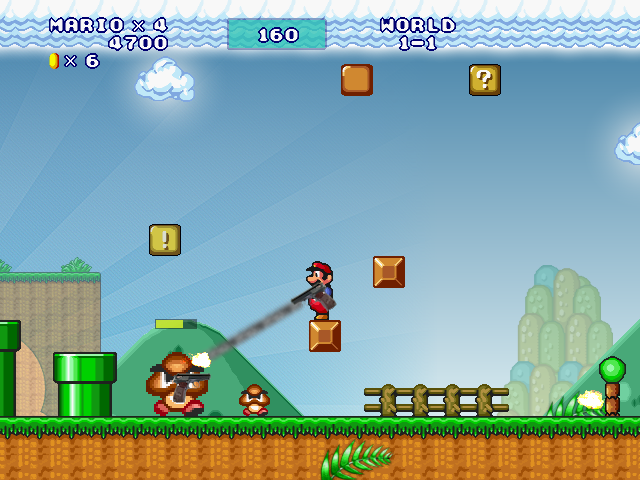
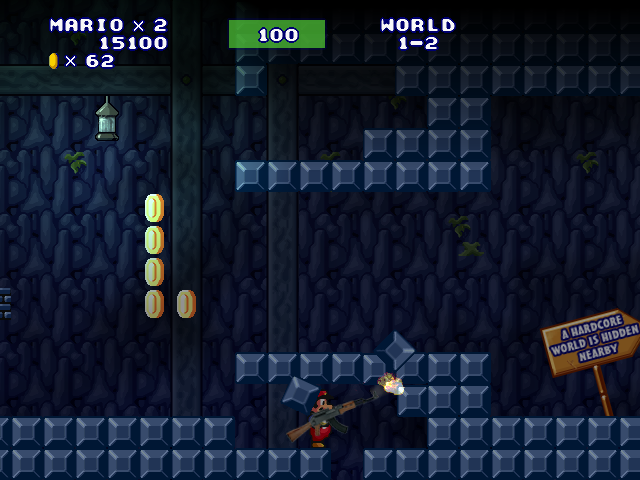
    Weapons. No more Fire Flowers or Beetroots; instead, you're wielding firearms.
    Health Bar. Getting hit reduces your health, instead of instantly killing you from enemies.
    Dangerous enemies. Your enemies have learned how to collect coins and power-ups. If you are not careful, it's easy to cause chaos!
    No time limit. Time limit is never fun!
    And much more!

    All levels have been modified to accommodate the new changes. Good luck and have fun!

    Please, make sure not to spoil the experience of others in the first week after the game's release, be a good person!

    Screenshots:

    6182df32-45b1-4ca4-ac58-f97864c0b917-image.png
    d18e1166-5d78-4982-b7a3-c7a7baaa5d78-image.png
    911cfaea-89c8-4eb0-998d-f0aae9ad1e2e-image.png
    45418280-6528-4a24-b349-1ec4e68324f9-image.png

    This update was inspired by Super Mario 2011 fangame.

    Mario Forever: Community Edition

  • [WIP] Mario Worker: Community Edition
    JUE13J JUE13

    Devlog:

    • Added support for translations
    • Switching between editing categories now stores selected object for the previous category, like in MWR
    • Holding Ctrl in the editor and pressing arrow keys now scrolls the camera like in MWR
    • Added power-ups to the object list menu
    • Power-ups can be inserted into Containers (question block and brick) by selecting the power-up to paint, hovering over a placed container and pressing left click
    • Overworld music is now playing in levels (testing feature)
    Mario Worker
  • Login

  • Don't have an account? Register

  • Login or register to search.
Hosted by Meteo Dream Powered by NodeBB
  • First post
    Last post
0
  • Rules
  • Recent
  • Tags
  • Popular
  • External Links
    • Download Mario Forever
    • Cloud Lounge Discord
    • Mario Forever Wiki
    • Chinese Mario Forever Forum
    • List of Mario Forever Fangames
    • Mario Forever File Archive